
I wanted a kubenetes cluster for a long time to tinker with it and learn kubernetes the right way but i did not know where to start. In the current world computing, companies uses kubernetes services provided by cloud providers because it is easier to make them up and running, no need to worry about implementation details and specially exposing services to external networks because load balancing and networking are provided out of the box. But for a one who is eager to learn the inner workings of kubernetes, the best way to do it is building everything from scratch. In this case I chose the most baremetal and vanilla way to do it: kubeadm.
As a additional bonus, if your goal is to understand how Kubernetes components fit together or if you are preparing for certifications like the CKA, kubeadm is the official, vanilla bootstrapping tool. It sets up a standard, production-ready cluster. The othe two bets options were k3s and MicroK8s which were easy to configure and where is the fun in that?
My Plan
I already have the following setup up and running in the target machine I am going to run it. The machine is a oracle free tier VM running ubuntu. I am currently running few services using docker and docker-compose and exposing them using a Caddy reverse proxy.
So what I planned was to keep the caddy service and some services running natively without docker same and exposed with caddy while I point the root of my domain to a internal load balancer hosted using [MetalLB] so that internal services can be exposed to public internet using caddy with https and external world will not know if the services is natively running or inside a kubernetes cluster at all. Here is the the network traffic flow of my setup.
- Internet hits your Oracle VM on ports 80/443.
- External Caddy (Layer 1) intercepts the traffic.
- If the request is native-service.yourdomain.com, it proxies to localhost:>.
- If the request is internal-service.yourdomain.com, it proxies to your MetalLB IP.
- MetalLB (Layer 2) receives the traffic on its dedicated internal IP and hands it to the internal Caddy Ingress Controller.
- Internal Nginx Ingress (Layer 3) reads the hostname, looks at your Kubernetes Ingress rules, and routes the traffic to the correct pod.
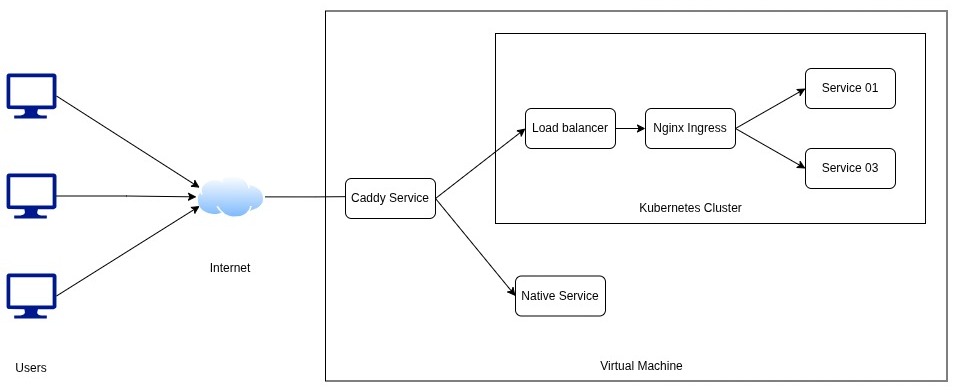
Step by Step Guide
Prerequisites
- Control Node
- A minimum of 2 CPUs
- A minimum 2GB of RAM
- Worker Nodes
- A minimum of 1 CPUs
- Memory same as control node
- For multi cluster setup
- all machines connected by a network.
- For standard deployments, swap memory must be completely disabled on all nodes.
Before going into installation, need to disable swap and load specific network modules to the kernel so pods can communicate.
# Disable swap immediately and permanently
sudo swapoff -a
sudo sed -i '/ swap / s/^\(.*\)$/#\1/g' /etc/fstab

# Load necessary kernel modules
cat <<EOF | sudo tee /etc/modules-load.d/k8s.conf
overlay
br_netfilter
EOF
sudo modprobe overlay
sudo modprobe br_netfilter

# Configure sysctl parameters for Kubernetes networking
cat <<EOF | sudo tee /etc/sysctl.d/k8s.conf
net.bridge.bridge-nf-call-iptables  = 1
net.bridge.bridge-nf-call-ip6tables = 1
net.ipv4.ip_forward                 = 1
EOF
sudo sysctl --system
1. Install a Container Runtime (Containerd)
Eventhough I have already installed and running docker, I chose to go with containerd because
- Native CRI Support: It communicates directly with the Kubernetes
kubeletwithout any messy translation layers or bridges. - Lightweight: Because it strips out all the developer-focused Docker CLI bloat, it uses significantly less RAM and CPU
- Stability: Fewer moving parts means fewer things can crash.
sudo apt update
sudo apt install containerd.io

# Configure containerd to use systemd cgroups (required by kubeadm)
sudo mkdir -p /etc/containerd
containerd config default | sudo tee /etc/containerd/config.toml
sudo sed -i 's/SystemdCgroup = false/SystemdCgroup = true/g' /etc/containerd/config.toml

# enable/start containerd
sudo systemctl enable containerd
sudo systemctl start containerd
3. Install Kubeadm, Kubelet, and Kubectl
## install prerequisites
sudo apt update
sudo apt install -y apt-transport-https ca-certificates curl

## add apt repository
curl -fsSL https://pkgs.k8s.io/core:/stable:/v1.34/deb/Release.key | sudo gpg --dearmor -o /etc/apt/keyrings/kubernetes-apt-keyring.gpg
echo 'deb [signed-by=/etc/apt/keyrings/kubernetes-apt-keyring.gpg] https://pkgs.k8s.io/core:/stable:/v1.34/deb/ /' | sudo tee /etc/apt/sources.list.d/kubernetes.list

sudo apt update
sudo apt install -y kubelet kubeadm kubectl

## hold the version to prevent them from updating
sudo apt-mark hold kubelet kubeadm kubectl
4. Initialize the Control Plane
Before the init command need to assign a subnet for the kubernetes cluster pods which does not crash with other internal and external networks. I chose 10.244.0.0/16 for myself.
sudo kubeadm init --pod-network-cidr=10.244.0.0/16
After initialization complete, need to get the kube config to the .kube directory inside the home directory so that kubectl tool can see the cluster.
mkdir -p $HOME/.kube
sudo cp -i /etc/kubernetes/admin.conf $HOME/.kube/config
sudo chown $(id -u):$(id -g) $HOME/.kube/config
5. Install a Pod Network and Untaint the Node
Kubernetes needs a CNI (Container Network Interface). Calico is excellent for a lightweight tinkering setup. Calico the CNI provides the actual, routable IP addresses for the pods so they can talk to each other across the network. Without it pods would have no IP addresses, no way to talk to each other.
## install tigera operator, which handles all the pods, services need for calico
kubectl create -f https://raw.githubusercontent.com/projectcalico/calico/v3.26.1/manifests/tigera-operator.yaml

## donwload calico config file
wget https://raw.githubusercontent.com/projectcalico/calico/v3.26.1/manifests/custom-resources.yaml
## update it to match with ip range we defined
sed -i 's/192.168.0.0\/16/10.244.0.0\/16/g' custom-resources.yaml
## Apply edited file
kubectl apply -f custom-resources.yaml
By default, Kubernetes prevents normal workloads from running on the control-plane node. Since this setup only have one VM, need to remove this restriction (taint). If the plan is to build a multi node setup this is not necessary.
kubectl taint nodes --all node-role.kubernetes.io/control-plane-
Now the kubernetes cluster is up and running. you can interact with it using kubectl. Now we can install MetalLb and NGINX ingress controller for network connectivity.
Install MetalLB and Ingress Controllers
Now that the cluster up and running we can setup the doorway for the external traffic to the kube cluster.
kubectl apply -f https://raw.githubusercontent.com/metallb/metallb/v0.14.3/config/manifests/metallb-native.yaml
Now need to provide metallb a pool of ip adresses to assign to internal ingress so that caddy can redirect requests to to the ingress. Keep in mind that these ip addreses should be in same subnet as the internal network ip of the vm is using because otherwise requests will not routed correctly when caddy asked for the destination. Choose some unused ip addresses from same subnet and assign those. Create a metallb config file (yaml file) and add follwoing content.
apiVersion: metallb.io/v1beta1
kind: IPAddressPool
metadata:
  name: local-pool
  namespace: metallb-system
spec:
  addresses:
  - 192.168.50.200-192.168.50.210
---
apiVersion: metallb.io/v1beta1
kind: L2Advertisement
metadata:
  name: local-advertisement
  namespace: metallb-system
Then apply it to the cluster
kubectl apply -f metallb-config.yaml
Configure Caddyfile to Point to MetalLB
open your caddyfile at /etc/caddy/Caddyfile and edit
yourdomain.com, app1.yourdomain.com, app2.yourdomain.com {
    # Forward all traffic to the MetalLB LoadBalancer IP
    reverse_proxy 192.168.50.200:80

    ## Add additional security and behaviour related things as needed
}
restart the caddy server
sudo systemctl restart caddy
Setup Ingress inside the Cluster
If you create an Ingress right now, absolutely nothing will happen because there is no “traffic cop” inside the cluster to read that piece of paper. You have to deploy the traffic cop first, which is called an Ingress Controller. I chose to use NGINX as the ingress controller but caddy also have a ingress controller.
Install NGINX ingress
kubectl apply -f https://raw.githubusercontent.com/kubernetes/ingress-nginx/controller-v1.10.0/deploy/static/provider/cloud/deploy.yaml
The second this command runs and completed, NGINX will request an external IP. MetalLB will hear this and assign it one of the IPs from your pool you created earlier, and hands NGINX that exact IP.
How This works
Now the metallb is running and the external domains can like yourdomain.com, app1.yourdomain.com, app2.yourdomain.com can reach the needed service if there is a ingress resource directing the relavant domain to the service. Follwoing is a example ingress resource like that.
apiVersion: networking.k8s.io/v1
kind: Ingress
metadata:
  name: public-ingress
  namespace: default
  annotations:
    # This tells NGINX to process the rules
    kubernetes.io/ingress.class: nginx
    # THE SCISSORS: This rewrites the URL, stripping the prefix before sending it to the app
    # only needed if using /app1 like urls
    # nginx.ingress.kubernetes.io/rewrite-target: /$2
spec:
  rules:
  - host: mohotta.site
    http:
      paths:
      - path: /
        pathType: Prefix
        backend:
          service:
            name: root-service
            port:
              number: 80
  - host: app1.mohotta.site
    http:
      paths:
      - path: /
        pathType: Prefix
        backend:
          service:
            name: app1-service
            port:
              number: 8080
Once a request is recieved
- Traffic hits app1.yourdomain.com.
- Host Caddy sends it to 192.168.50.200.
- The internal Ingress Controller receives it, reads the app1.app1.yourdomain.com, and routes it to your app1 pod via its service.
Services Currently Running in My Cluster
- A container image registry which contains all the private container images that is protected by a auth system
- A n8n instance migrated from running inside docker compose to inside the cluster with hostpath volume points to older config files
- A litellm instance managing all my llm api keys migrated same as n8n
- A openwebui instance migrated same as the above mentioned services